Apple Watch scoring
How to score padel on Apple Watch
Last updated 5 October 2026
Between rallies you have a few seconds and one free hand. Padelmatic puts the scoreboard on your wrist so you can tap the point, see who serves, and keep playing without digging for a phone.
The short version. Open Padelmatic on Apple Watch, pick the format, choose who serves, then tap Start Match. Tap the side that wins each point. Swipe to Match Controls for Undo. Scoring works offline; match scoring requires Padelmatic Pro.
Why the watch matters on a padel court
Padel courts are enclosed and short on pockets. Pulling out a phone mid-game slows the next serve and invites arguments about who touched what. A wrist scoreboard stays with the hand that is already free between points.
Padelmatic ships a real watchOS app with match setup, a live scoreboard, and a watch-face complication — not a mirror-only glance.
Set up the match on your wrist
From the watch app, configure the match before anyone serves:
- Format — traditional sets and games, Americano scoring, or a custom total-points match.
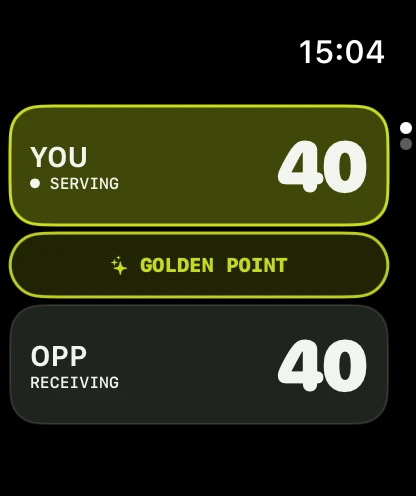
- At 40–40 — Advantage, Golden point, or Star point on traditional matches.
- Match length — 1 set or best of 3, with an optional super tiebreak for the deciding set.
- For Americano or custom points — choose the total point target, serves per team, and how the round ends.
- First serve — You or Opponents, then tap Start Match.
The Star point option in the app decides the game on the next point at 40–40, the same sudden-death path as Golden point. For the official FIP Star Point used on named circuits, read the full scoring rules guide.
Tap points between rallies
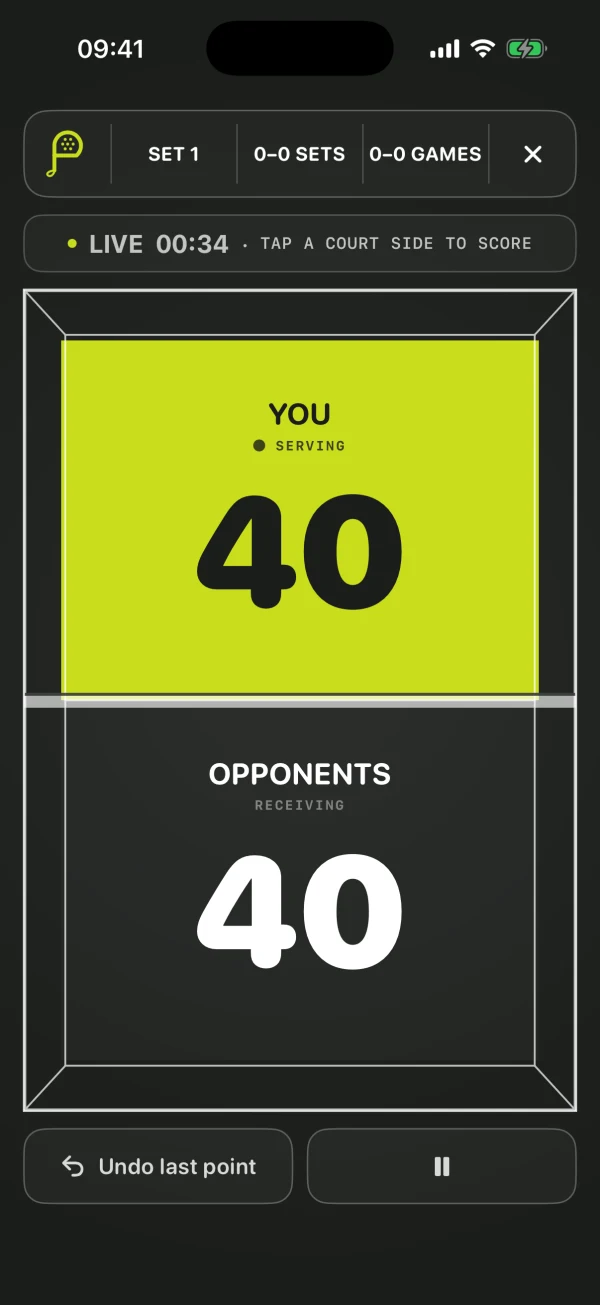
The scoreboard shows your side and the opponents. The serving side is marked so you do not have to remember the rotation yourself.
When a rally ends:
- Tap the side that won the point — games, sets, and the match advance on their own.
- Swipe to Match Controls when you need Undo; one tap steps back a point at a time, including across game and set boundaries.
- If the watch is acting as a read-only mirror, score on the device that currently controls the match.
Which device is in charge
iPhone and Apple Watch share one scoring engine. Either device may control the live match when they can talk to each other; the watch status line tells you whether this Watch controls scoring or is a read-only mirror.
That split exists so an older snapshot cannot quietly overwrite a newer finished result. If taps seem ignored, check which device currently owns scoring authority.
Keep the score on the watch face
Padelmatic can show a live score complication while a match is in progress — sets and games for traditional matches, or the running total for point-target formats.
When the match finishes or is abandoned, the complication clears so a frozen score does not linger on the face.
Offline by design
Scoring, history, and settings on the watch do not need a network. Courts with bad signal are the normal case, not an edge case.
Optional Sign in with Apple syncs history across devices later. You can score a full match with no account.
Ready between the next two rallies
Install Padelmatic, unlock Padelmatic Pro when you are ready to score, and start the first match from your wrist.